
Live tracking
Follow your booking in real time
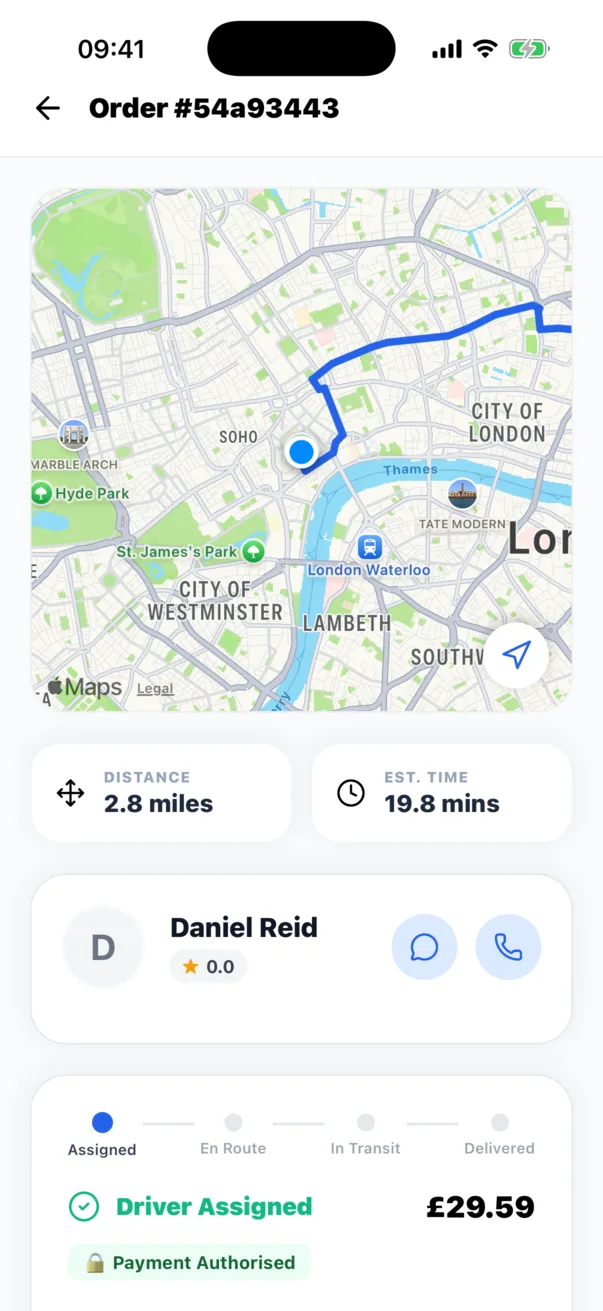
Once a driver is assigned and on the way, your booking page shows the job status, the route and the driver location when it is being shared. Track on the web or in the app.
What you see
Everything about the job in one view
Pickup and drop-off
Both points on the map with the planned route.
Driver position
Updates from the assigned driver while the job is active.
Status timeline
Assigned, en route, collected and delivered.
Messages
Contact the assigned driver from the booking.
Privacy
Location is shared only for active jobs
Driver location is shown to the customer on their own booking while that job is active. It is not shown to other customers, and tracking stops when the job ends.
If a driver location is not available, for example while the driver has no signal, the booking page continues to show the latest status and the map updates when location returns.
Questions
Frequently asked questions
Where do I find tracking?
Sign in and open My bookings. Choose an active booking to see its status and map.
Is tracking available for Hire bookings?
Hire booking pages show the shift status and, where the worker shares it, their location on the way to you.